Choose how you use the property. Each one has its own expenses, documents and reminders in the app.
EVERYDAY HOME TRACKING
All your home payments in one place.
Utility bills, mortgage, insurance, repairs and appliance purchases. A clear picture of every month.
Expenses and changes
Meter readings and rates
Maintenance and document deadlines
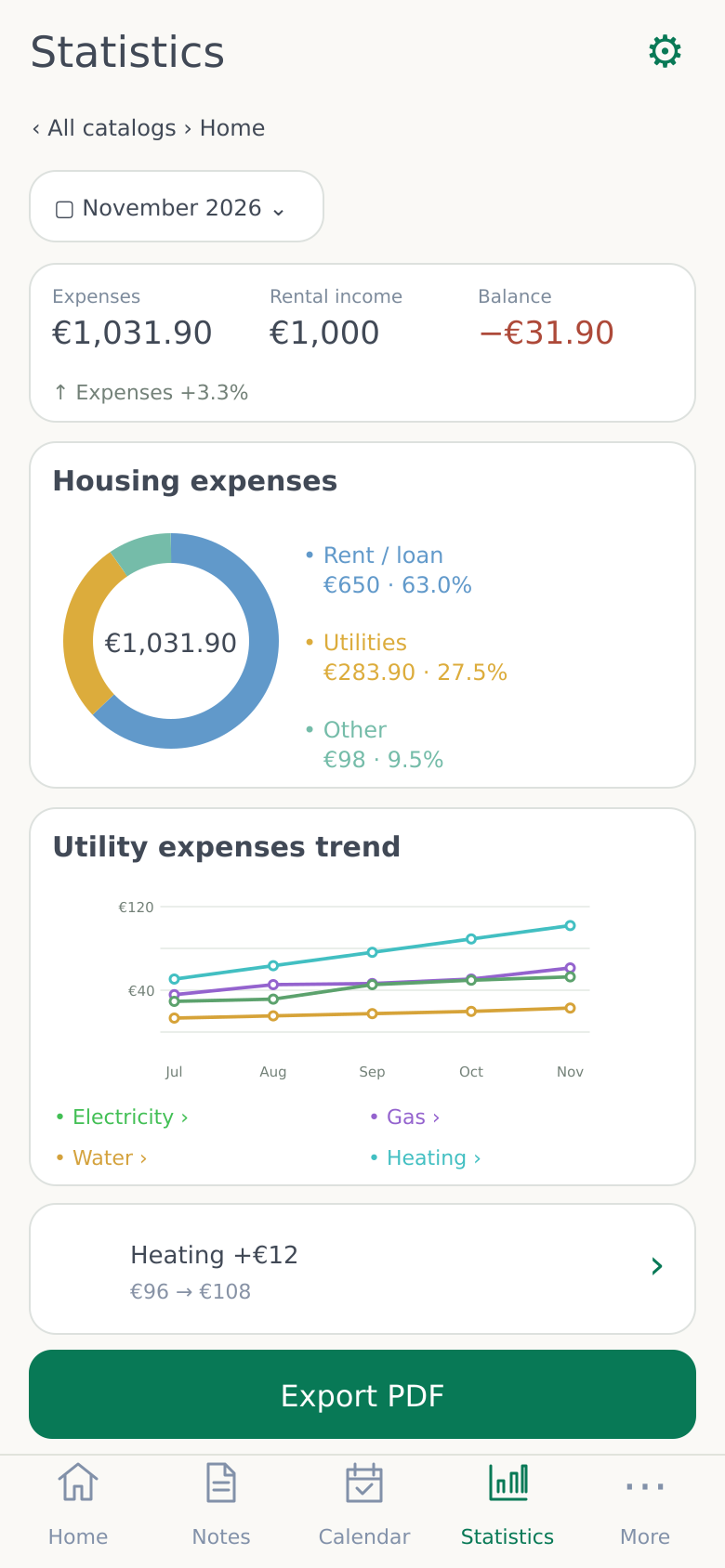
Actual app screens · Sample data. Tap to enlarge.
More than a total
Where do you spend? What has changed?
See changes in bills and the breakdown of expenses. Open a category to view individual entries.
Expense breakdown
Rent / mortgage, utilities and other expenses — amounts and percentages.
Utility expense trends
Electricity, gas, water and heating expenses by month.
Income and balance
Recorded rental income and the balance after home expenses.
Changes and insights
Comparison with the previous period, increased expenses and a forecast when there is enough data.
What expenses can I record?
Rent / mortgageElectricityGasWaterHeatingInternetInsuranceRepairs and maintenanceAppliancesOther
Enter the amount, date and description. The home overview shows an expense chart, a six-month chart and recent entries.
When are trends and forecasts shown?
Insights are based on your entries. A consistent trend requires three full months of data. A forecast for the current month is shown after at least 7 days, with expenses on at least three different days.
The utility trends chart shows monetary expenses. Electricity and water consumption charts are included in the home PDF report.
How can I keep track of my monthly home budget?
In your home folder, record rent or loan payments, electricity, gas, water, heating, internet and maintenance costs. Categorized entries help show where your money goes, and the overview lets you compare spending across several months. Recording a payment in the app is a bookkeeping action; it does not debit your bank account.
Readings → consumption → amount
From a meter reading to a clear bill.
Enter the readings and rate. SpendOutline calculates consumption and adds fixed and additional charges.
ElectricityGasWaterHeating
Electricity supports separate standard and night-rate readings and prices. The latest readings and rates are suggested for a new entry.
Interactive electricity example
Consumption250 kWh
Calculated amount63,00 €
Example calculation on the website. In the app, the amount is added to expenses only after you confirm it.
For landlords
Received. Still due. All in view.
Enter the tenant, monthly rent, payment day and start date. Record payments received — in full or in instalments.
Amount dueRent receivedStill due
Each payment has a receipt date and an assigned rental month. The balance shows income received minus home expenses.
Maintenance
Homes need attention. We'll remind you when.
Boiler inspections, filter changes, repairs or insurance renewals — each with its own date and reminder.
Planned task
Reminder at your chosen time
30 days before · 7 days before · On the due date · Custom time
Repeating tasks and completed work expenses
Set tasks to repeat every 6, 12 or 24 months, or at your own interval. Choose a reminder time and a custom number of days before the due date.
When you mark a task as completed, enter its completion date and cost. The cost is added to maintenance expenses, and a new due date is created for recurring tasks.
Documents
Contracts and warranties. Where you need them.
Assign documents to your home and find them in one place. Set expiry reminders.
Home documentsContracts · Invoices · Warranties
Rental agreements
Insurance policies
Repair invoices
Appliance warranties
Files, scanning and expiry dates
Store PDFs and photos, add multiple files or scan a document into a multi-page PDF. The scanner supports up to 50 pages.
Enter a name, seller or contracting party, dates and notes. For a warranty, add the model and serial number.
Set reminders 60, 30 or 7 days before expiry, or on the expiry date. Documents can be viewed and shared using apps on your phone.
Detailed home PDF report
The whole period. One clear report.
Income, expenses, utility cost changes and entry history — in one document.
Saving, sharing and printing PDFs — PRO.
01Income, expenses and balance
02Category chart and monthly comparison
03Utility expense amounts and percentage changes
04Electricity kWh and water m³ charts
05Detailed expense and rental income summary
Your mortgage — in your monthly records.
Enter the bank, monthly payment and end date. The payment is automatically recorded as an expense on the 1st of each month. You can enable a reminder or pause recording.
Does recording home payments withdraw money from my bank?
The app creates an accounting entry until the specified end date. No money is taken from your bank account. This feature does not calculate interest, the outstanding loan balance or amortisation.